Cut files & costing data, straight from the model.
One click per part or per whole assembly (ZW3D native or STEP): a clean flat-pattern DXF with separate cut and crease layers, plus length, width, thickness and cut perimeter — written to the part's user properties, ready for BOM, nesting and quotation.
Free trial, no registration · signed installer, 2.4 MB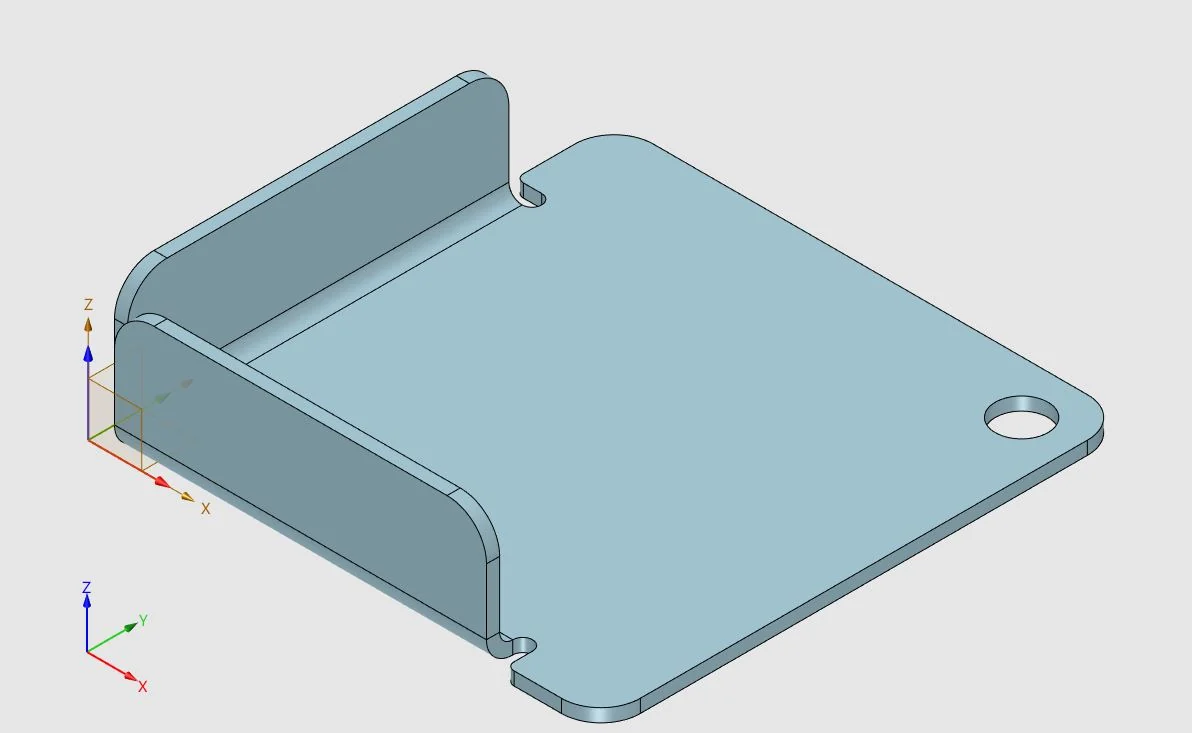
From a STEP assembly to cut files
Three tools, one workflow
FlatCut — cut file & perimeter
Exports a clean DXF of the flat pattern — outer contour and holes only, no bend lines, no clutter — and writes length, width, thickness and cut perimeter to the part's user properties.
In plain ZW3D a cut-ready DXF means unfold, silhouette and export for every part. FlatCut does it in one click, for every part of the assembly. Flat plates need no Flatten: the geometry is read directly.
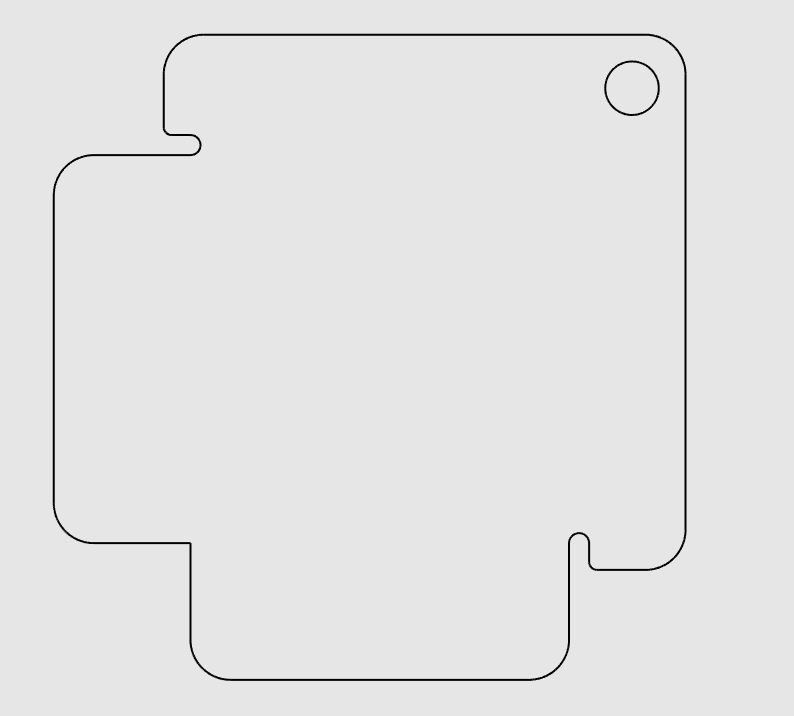 Fig. 2 — DXF, cut contour only
CreaseCut — cut & crease
Same as FlatCut, plus bend / crease lines on a separate color in the DXF and their total length as a user property — for corrugated plastic, cardboard and bent sheet.
Supports a fabrication configuration for extra fold lines.
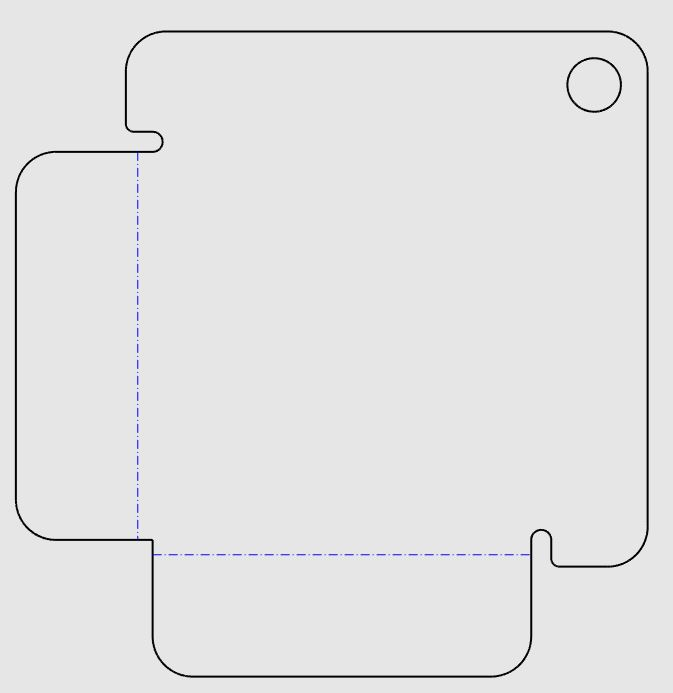 Fig. 3 — DXF, cut (7) + crease (5)
AutoBend — sheet metal from STEP
Imported STEP parts arrive as plain solids that ZW3D cannot unfold. AutoBend finds the bends, applies Mark Bend and Flatten and checks the flat pattern against the part. If the check fails, the part is left exactly as it was.
Hems (180° bends) and embossings included. Runs on its own, or automatically inside FlatCut and CreaseCut when a part needs it.
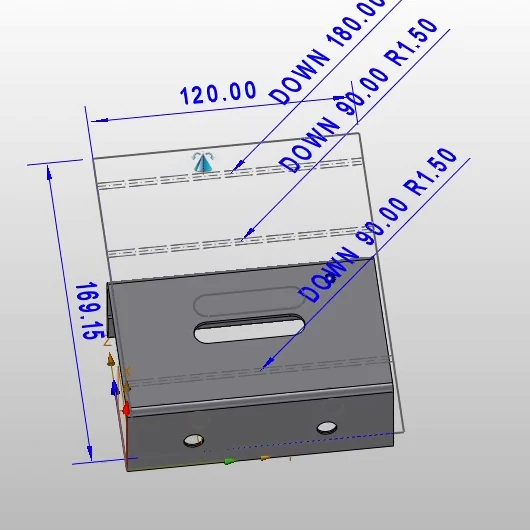 Fig. 4 — STEP bracket after AutoBend: bends + hem
Built for the whole product, not one part
Run it once on the top assembly. Every sheet part gets its DXF and properties; everything else is sorted out, not guessed.
What gets written
| Length, Width, Thickness | FlatCut, CreaseCut |
| Cut perimeter (contour + holes) | FlatCut, CreaseCut |
| Crease length | CreaseCut |
| DXF next to the part file | FlatCut, CreaseCut · cut = color 7, crease = color 5 |
| Mark Bend + flat pattern in the part | AutoBend |
Runs in Part or Assembly context. Values are written in the units of the file.
Workshops that cut parts from sheet or plate
…and need dimensions and cut lengths for stock, nesting and quotation.
Fits your templates, not the other way round
One settings window for the whole suite, on its own 3DPS Cut Tools ribbon tab.
For the shop floor or the design office
FlatCut
FlatCut + CreaseCut
AutoBend
For businesses only. Prices exclude VAT: EU companies with a valid VAT number are invoiced without VAT (reverse charge), Romanian companies with VAT. Launch prices for orders placed until 31 December 2026; from 1 January 2027 the list prices apply.
Which one? FlatCut already recognises the bends of imported STEP parts when it unfolds them — for cut files you do not need AutoBend. AutoBend is for design work: sheet metal models for drawings and changes, without cut files.
License. Perpetual license per computer, with updates.
How to buy. Try everything with the free 31-day trial, then write to contact@3dprojectsystems.com with your company details and the Machine ID shown in Settings. You receive the invoice; after payment, the license keys for that computer.
31-day free trial
All three modules, full function, no registration. Download, install, run it on your own parts.
| Version | 1.0.12 · 9 Oct 2026 |
| ZW3D | 2025, 2026, 2027 · an edition with Sheet Metal (Standard, Professional, Advanced, Ultimate) |
| Windows | 10 / 11, 64-bit |
| Installer | 2.4 MB, signed by 3D PROJECT SYSTEMS S.R.L. |
The installer shows the End User License Agreement first; you accept it before installing.
Didn't work on your parts? Send us the .log file written next to your model — contact@3dprojectsystems.com — and we look into it.
Three steps
- Run the installer (administrator rights). It finds the ZW3D versions on the computer and lets you choose.
- Start ZW3D — the 3DPS Cut Tools tab appears in the ribbon, for every user of the computer.
- To keep using it after the trial, send the Machine ID from Settings to contact@3dprojectsystems.com and paste the key you receive.
No administrator rights? Email us – we’ll help you set it up. Uninstall any time from Windows Settings › Apps.
Questions we get asked
Which ZW3D versions does Cut Tools support?
ZW3D 2025, 2026 and 2027 on Windows 10 and 11, 64-bit. One installer covers all three: it finds the ZW3D versions installed on the computer and lets you choose.
Does it work on imported STEP files?
Yes. STEP parts arrive as plain solids that ZW3D cannot unfold. AutoBend finds the bends, applies Mark Bend and Flatten and checks the flat pattern against the part; hems (180 degree bends) are included. If the check fails, the part is left exactly as it was.
What is written to the part properties?
Length, width, thickness, cut perimeter (outer contour plus holes) and, with CreaseCut, the total crease length. The property names are configurable to match your BOM templates, and the values are written in the units of the file.
What does the DXF file contain?
The flat pattern, saved next to the part file. FlatCut writes the cut contour and holes only; CreaseCut adds the bend and crease lines on a separate color (cut = color 7, crease = color 5), ready for laser, plasma, waterjet or a cutting table.
Can it process a whole assembly in one go?
Yes. Run it once on the top assembly: sub-assemblies are processed at any depth, identical parts only once, multi-body parts body by body. Tubes and extruded profiles are listed with their cut length, standard parts (ISO, DIN, JIS) are skipped, and a report shows what was done and why.
Which materials is it for?
Anything cut from sheet or plate: sheet metal for laser, plasma or waterjet; corrugated plastic and cardboard with crease lines (CreaseCut); technical textiles, foam and gaskets; acrylic, wood and composite panels on CNC routers (FlatCut).
How do I get the trial, and what happens after 31 days?
Download the signed installer from this page, no registration needed. The trial runs 31 days with all modules and full function. To keep using it, send the Machine ID shown in Settings and you receive a license key for each module on that computer.
Which ZW3D edition do I need?
Cut Tools runs in ZW3D 2025, 2026 and 2027, in an edition that includes Sheet Metal Design: Standard, Professional, Advanced or Ultimate. ZW3D Lite and the Machining-only editions have no sheet metal module, so Cut Tools cannot unfold parts there.
What happens to my license if I replace my computer?
The license is tied to one computer through its Machine ID. If you replace the computer or reinstall Windows, send us the new Machine ID and confirm that Cut Tools was removed from the old one - you receive a new key at no cost.
How much does it cost?
FlatCut: list price €490, launch price €330. FlatCut + CreaseCut: list price €550, launch price €370. AutoBend (for design work, without cut files): list price €390, launch price €260. FlatCut already recognises the bends of imported STEP parts, so for cut files you do not need AutoBend. Launch prices apply to orders placed until 31 December 2026. For businesses only; prices exclude VAT. Perpetual license per computer, with updates.
Does it need an internet connection or send any data?
No. Cut Tools works offline and does not send any data over the internet; the license is checked on your computer. A diagnostic file for support is written only if you turn it on in Settings; it contains no part names, paths or geometry, and reaches us only if you send it.
Is Cut Tools made by ZWSOFT?
No. Cut Tools is developed by 3D Project Systems, a mechanical engineering office in Romania, as a native plugin on the ZW3D C++ API. ZW3D is a product of ZWSOFT Co., Ltd.; we are not affiliated with ZWSOFT. We also build custom ZW3D plugins and automation on request.
What we are building now
Flat patterns of all parts on your own drawing template, with overall dimensions and position labels.
One row per part — status, dimensions, cut perimeter, quantity; tube cut lengths ready for nesting.
Tell us what you need
Missing a feature? Does your workshop do it differently? Suggestions from real use decide what we build next — every message is read by the people who write the code.
Why ZW3D
ZW3D is ZWSOFT's integrated CAD/CAM system for mechanical design, sheet metal and machining, with a hybrid solid–surface modeling kernel and a full C++ API. It is our main design tool, and Cut Tools is a native ZW3D plugin written directly on that API — no bridges, no exports: it reads the part's geometry and sheet-metal data in place and writes back into the part's own properties.
Built on ZW3D Sheet Metal. Cut Tools adds a production workflow on top of ZW3D's own sheet metal tools: it prepares imported STEP parts for Flatten, runs through whole assemblies in one go, and writes dimensions and cut perimeter to the part — where your BOM and quotation need them.
Cut Tools targets ZW3D 2025 and later. ZW3D is a product of ZWSOFT Co., Ltd.
Engineering first
3D Project Systems is a mechanical engineering office in Romania. We do CAD design work for manufacturing customers and build the tools we miss along the way — ZW3D add-ons and automation on the ZW3D C++ API, for ourselves and on request for others.